Profiles for mixed farms
Enable floriculture, vegetables, orchards, vineyards, field crops, or urban trees at the same time. General branch alerts remain active.
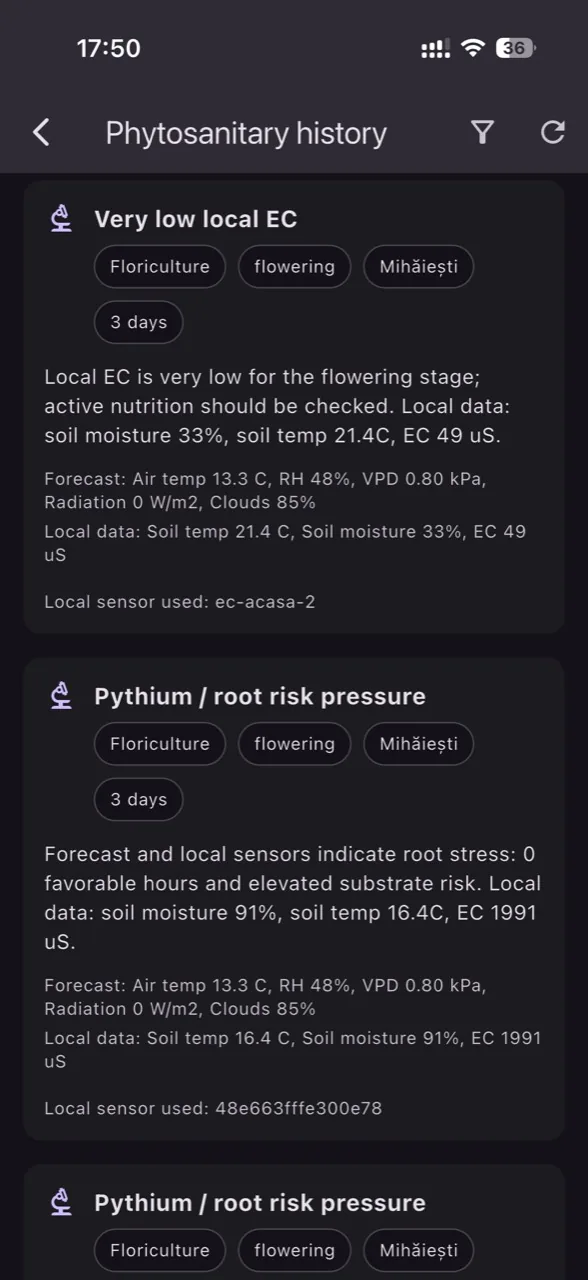
GrowGuard combines agrometeorological forecast, local sensors, and crop-specific disease rules to make risk signals easier to act on. You can enable multiple profiles for mixed farms, then choose crops or species: vegetables, ornamentals, orchards, grapevine, field crops, and urban trees. AI explains why an alert appeared, which factors support it, and what should be checked in the field.
Enable floriculture, vegetables, orchards, vineyards, field crops, or urban trees at the same time. General branch alerts remain active.
Select tomato, potato, apple, pear, rapeseed, wheat, beet, plane tree, maple, linden, and other species for more precise models.
Forecast can be adjusted with EC, pH, soil moisture, soil temperature, and leaf wetness when those readings are available.
AI does not automatically prescribe treatments. It explains the risk and suggests checks; products, doses, and withholding periods depend on labels and local rules.
Select one or more branches, then the crops or species that match your farm.
The engine combines forecast, weather windows, local sensors, and leaf wetness where available.
Check leaves, soil, microclimate, and official recommendations before any intervention.
Install GrowGuard and monitor phytosanitary pressure alongside sensor readings.
No. AI provides explanations and operational orientation, but product choice, dose, label compliance, and withholding period must be validated by the user or specialist.
Forecast provides the broader weather context, while local sensors can confirm temperature, humidity, or wetness in the exact crop zone.