In greenhouses, flower farms, vegetable operations, orchards, and vineyards, irrigation problems often show up “silently”: a row receives less water because of clogged drippers, an entire sector stays dry due to a valve or pump issue, while another sector becomes overwatered because of a scheduling mistake, a leak, or excessive pressure. The difference between a small issue and an expensive one is how quickly you notice it—and how clearly you can localize it to the affected zone.
An effective workflow combines direct measurement of the outcome (soil/substrate moisture) with signals from the irrigation system (flow and pressure, when available), then uses zone alerts and history verification to confirm the root cause. GrowGuard helps make this repeatable through live monitoring, a sensor map, reports, team access, and battery/sensor status monitoring, with LoRaWAN and NB-IoT connectivity and integrations via MQTT or TTN API imports.
Below is a practical process—usable from 1–2 zones to dozens of sectors—that helps you quickly detect clogged drip irrigation, irrigation system failures, or overwatering, without relying on random walk-through inspections alone.
1) What you’re trying to detect—and why it matters: symptoms vs. causes
In the field, three core scenarios dominate: (A) clogged drippers or weak distribution: part of a zone receives too little; (B) non-watering sectors: an entire zone receives nothing; (C) overwatering: too much water is applied in a zone, or irrigation runs too often. All three damage drip irrigation uniformity and increase water/energy costs, and they also distort fertigation and plant-protection decisions.
A key point: soil moisture sensors measure the root-zone outcome, not the mechanical cause. That’s an advantage for decision-making because plants respond to the outcome. When you add an irrigation flow meter and irrigation pressure monitoring, you can separate likely causes much faster: no flow, insufficient pressure, progressive clogging, leaks, or scheduling/control errors.
In GrowGuard, the goal is to translate these scenarios into clear zone rules: what “successful irrigation” looks like for each sector and what deviations should trigger soil moisture alerts or system alerts (flow/pressure).
2) What to measure at minimum (and what to add for faster diagnosis)
The minimum for fast detection is a network of soil moisture sensors by zone. Ideally, each sector has at least one representative point; for large or heterogeneous zones, use two or more points. In orchards and vineyards, choose positions that cover soil and exposure differences. In greenhouses and flowers, consider bed/bench, substrate type, and planting density.
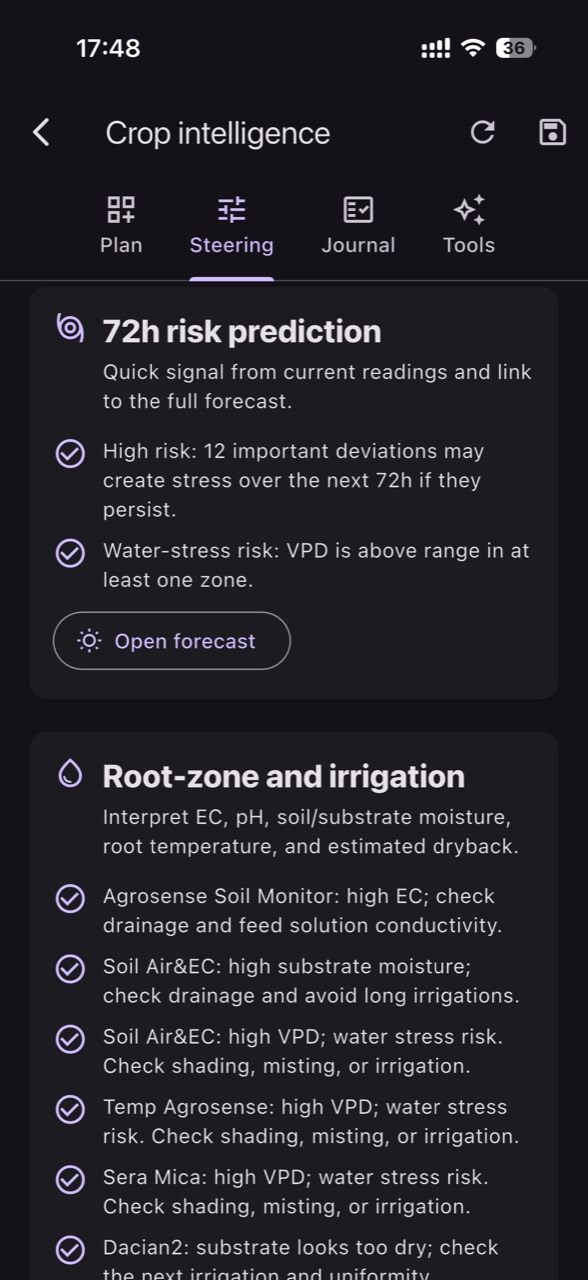
What’s worth measuring in parallel: soil/substrate temperature (affects uptake and evaporation), air temperature and air humidity plus VPD (explains why one day “pulls” more), and EC and pH (to interpret when an irrigation issue becomes a nutrition issue too). GrowGuard can centralize these streams and display them on the sensor map and in trends, with battery status and signal quality, so you don’t confuse an irrigation issue with a communication or power issue.
For system-level diagnostics, add where feasible: (1) flow on a main line or key zones (irrigation flow meter), (2) pressure at the start or end of a sector (irrigation pressure monitoring). Flow quickly tells you whether irrigation is actually happening; pressure tells you whether it’s happening within expected parameters. You don’t need sensors on every branch to get value—just a few strategic points can separate likely causes quickly.
3) Zone mapping in GrowGuard: structuring your system to spot anomalies
Start by defining zones the way you make decisions: irrigation sectors, plots, greenhouse blocks, orchard rows, or dripline groups. Then assign each sensor to the correct zone. The sensor map in GrowGuard matters not only for navigation but for avoiding operational “blind spots”: you immediately see which zones have data, which zones lack coverage, and which sensors have low battery or are offline.
For sensor distributors, this zone structure is also the basis for repeatable deployments: a zone template, a sensor bundle (moisture, EC/pH, air, pressure/flow), and a standard alert set that is later tuned by crop.
If you run your own infrastructure, GrowGuard supports LoRaWAN and NB-IoT connectivity, and for integration with existing systems you can use MQTT or TTN API imports. The priority is to bring data into one place for comparison: root-zone outcome + weather/air drivers + system signals.
4) Threshold setup: what “normal moisture rise” looks like after irrigation
A workflow only works if you define “successful irrigation” numerically. In practice, you don’t need perfect academic calibration; you need operational thresholds: how much moisture should increase (or how much tension should drop, if using matric potential sensors), within what time window after irrigation starts, and how quickly it returns to normal consumption.
In GrowGuard, use history from a few “good” irrigation events to establish a baseline: pre-irrigation, immediately after, at 30–60 minutes, and a few hours later. Observe how each zone behaves: coco substrate rehydrates differently than clay loam soil, and mulched blocks dry differently than exposed soil.
For practical thresholds: define a green band (target moisture range), a yellow band (attention: below or above target), and a red band (risk: severe under-irrigation or overwatering). Soil moisture alerts should be sensitive enough to warn early, but not so aggressive that the team learns to ignore them.
5) Fast detection workflow for a “non-watering sector”
Symptom: after a scheduled irrigation, soil moisture in that zone doesn’t move—or continues to decline as if irrigation never ran. This is the typical signature of a non-watering sector (valves, pump, major filter blockage, wrong schedule, broken mainline upstream of the zone).
Practical steps in GrowGuard: (1) Check live monitoring for the suspect zone and compare it to a similar zone that did irrigate. (2) Check history to see whether the same anomaly appeared during previous irrigations or if it’s new. (3) If you have flow/pressure: verify whether there was flow and pressure during the irrigation window. Zero or far-below-normal flow points to supply/valve/pump issues; abnormal pressure can suggest a partially closed valve or major blockage.
Field action (recommended order): confirm schedule/control logic, check power and valve actuation, then the main filter, then a quick visual inspection for breaks/leaks on the mainline. The purpose is to use data to go straight to the most likely cause rather than “hunt” across the farm.
6) Fast detection workflow for clogged drip irrigation and uneven distribution
Symptom: within the same zone, some sensors show a normal rise after irrigation while others show a smaller or delayed rise. Or, if you only have one sensor per zone, you see a trend where irrigations no longer increase moisture the way they used to—even though runtime is unchanged. This pattern is typical of clogged drip irrigation, progressive clogging, deposits, insufficient filtration, biofilm, or particulates.
In GrowGuard, the key is zone-based irrigation monitoring with internal comparison: place two points in critical zones (end-of-line vs. start-of-line, outer row vs. inner row). Then evaluate uniformity: the gap between post-irrigation responses. If you have pressure, measure at the end of the line; low end pressure can explain local lack of delivery. If you only have mainline flow, you may see that irrigation “ran,” but the effect doesn’t reach the root zone uniformly.
Recommended actions: (1) check and clean filters; (2) flush lines; (3) review fertigation chemistry and compatibilities (EC/pH), because precipitates often come from pH and incompatible fertilizers; (4) replace drippers/emitters in zones with repeated issues. Use GrowGuard reports to document which sectors show recurring deviations so maintenance becomes planned rather than purely reactive.
7) Fast detection workflow for overwatering (too much or too frequent irrigation)
Symptom: moisture stays above target for long periods, rises too much after each irrigation, or doesn’t drop between irrigations. In greenhouses, overwatering can be masked on low-VPD days (high air humidity) when transpiration declines; in open-field blocks it often appears after rainfall, after a schedule change, or when a sector has leaks or valves stuck open.
In GrowGuard, correlate: (1) soil moisture with temperature, air humidity, and VPD; (2) forecast and rainfall events (via a weather station or integrated data); (3) irrigation runtimes (if recorded in your control system) and the windows where moisture rose. If you have flow/pressure, unusually high flow or unstable pressure can indicate a leak or a cracked pipe that is “irrigating” uncontrolled.
Actions: adjust thresholds and irrigation windows based on demand (VPD/temperature), reduce runtime or frequency, and verify valve closure and system tightness. For sensitive crops, use indirect risk context too: when VPD is low and soil moisture stays high, disease pressure often increases. GrowGuard can provide AI-assisted phytosanitary alerts to help you stay attentive to favorable conditions, without replacing scouting or the agronomist’s final decision.
8) How to confirm the root cause: history checks, zone comparisons, and reports
Once an alert fires, the next step is confirmation. History verification helps answer three questions: (1) Is it new or recurring? (2) Is it local (a row/line) or systemic (multiple zones)? (3) Does it correlate with an intervention (filter change, fertigation event, repair, schedule update)?
In GrowGuard, use time-window comparisons: compare the same day across multiple zones and compare the same zone across different days. A system-wide failure at the pump or main filter level will create similar deviations in many zones; clogged drippers are usually more “patchy” and progressive. Program-driven overwatering shows a repeated pattern, while a leak can create continuous rises or abnormal plateaus.
Reports are useful for management and teams: zone summaries showing hours below/in/above target, plus lists of offline sensors, low batteries, and missing data. This reduces time lost to interpretation and standardizes how decisions are made.
9) Zone alerts: simple, actionable rules the team can execute
Alerts work when they’re easy to understand and clearly linked to an action. Build them on three levels: (1) Under-irrigation alert: moisture below a threshold and/or missing post-irrigation rise; (2) Overwatering alert: moisture above a threshold for too long; (3) System alert: flow/pressure outside the normal band during the irrigation window.
In multi-person operations, assign responsibilities: who receives the alert, who validates in the field, who logs the intervention. GrowGuard supports team access so the owner/manager, farm lead, and irrigation technician see the same picture. Also monitor sensor status (battery, connectivity) to avoid false alarms from an offline device.
For distributors, a crop- and irrigation-type alert starter pack (drip, micro-sprinkler) becomes a strong commercial deliverable: the customer sees value in week one, even if thresholds are refined over time.
10) Data integration: why LoRaWAN/NB-IoT and APIs (MQTT, TTN) matter
Fast detection depends on data reliability. On farms, coverage and power are real constraints. LoRaWAN is useful for large coverage with low power, while NB-IoT works well where cellular coverage is strong and deployments need to be fast. The key is a resilient architecture: battery monitoring, signal checks, and transmission intervals that match irrigation dynamics.
GrowGuard can aggregate data from different networks and devices. If you already run gateways and devices in The Things Network, TTN API imports reduce integration effort. If you have PLCs, SCADA, or controllers that can publish telemetry, MQTT is a practical way to bring flow, pressure, or even valve/pump states into the same interface as soil moisture.
When all data lives together, diagnosis speeds up: soil moisture confirms the outcome, flow/pressure confirm system operation, and environmental drivers (temperature, air humidity, VPD) explain changes in demand.
Conclusion
An irrigation system may look fine “at a glance,” but real problems emerge at zone and root level: clogged drip irrigation, non-watering sectors, or overwatering. A simple workflow built on soil moisture sensors—and strengthened where possible with an irrigation flow meter and irrigation pressure monitoring—lets you detect issues early and intervene precisely.
GrowGuard supports this process with live monitoring, a sensor map, zone alerts, history verification, and reports, plus decision context features (forecast, VPD, EC/pH, battery and sensor status). With team access and integrations via LoRaWAN, NB-IoT, MQTT, or TTN API, you can standardize detection and response across greenhouses, horticultural farms, and sensor distribution projects—without unrealistic guarantees, but with stronger operational control and faster reaction to deviations.