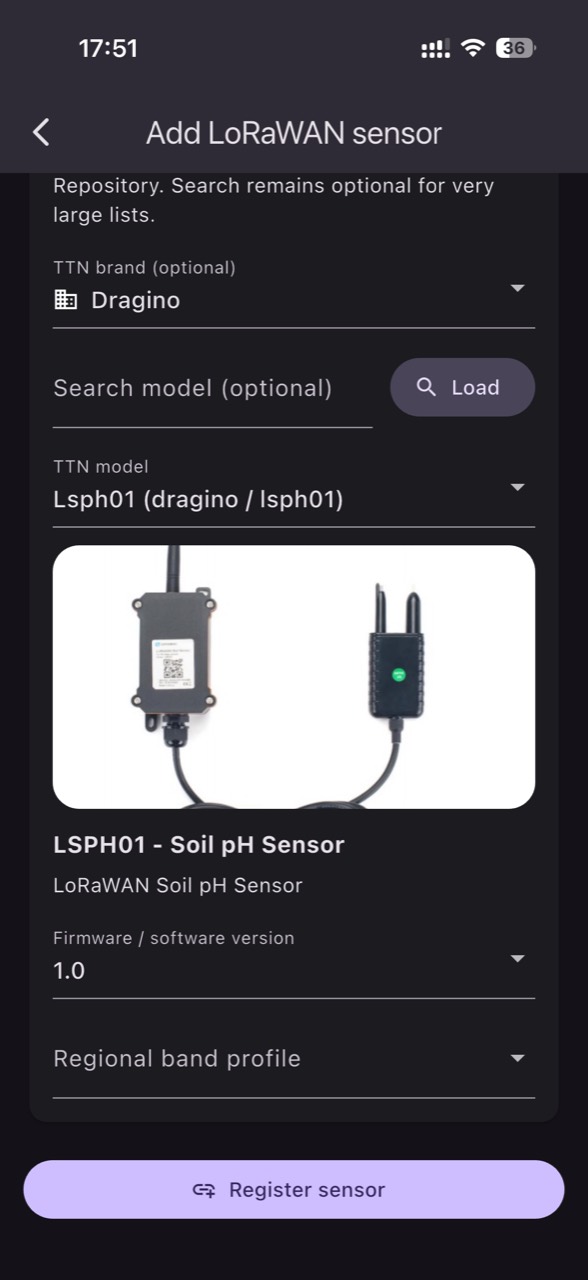
Integrating a sensor into a monitoring platform is not just about “a chart appears”. In production, the difference between a successful project and one full of false alarms is commissioning: correct device identity, coherent units, payload interpretation, and verifying the freshness of incoming data. For distributors and integrators, a repeatable checklist reduces time-to-usable readings and cuts down follow-up site visits.
LoRaWAN, NB‑IoT and MQTT solve different problems. LoRaWAN is a radio technology that relies on a gateway and a network/application server chain; NB‑IoT uses cellular infrastructure and depends on operator support, device band and subscription; MQTT is an IP publish/subscribe messaging protocol, ideal when you already have connectivity and a broker. In practice, many projects mix them: LoRaWAN or NB‑IoT to the cloud, then MQTT as a bridge between systems.
The workflow below is technical and commissioning-focused: what to observe in the data, what to verify independently on-site, what practical decision to take when an anomaly appears, and how to confirm the fix actually worked. Examples are explicitly hypothetical and avoid irrigation/crop templates; the focus is data mechanics, reliability, and protocol distinctions.
1) Define the requirement: what the sensor proves, and what it does not
Before choosing a protocol or wiring an integration, define a measurement “contract”: which variable, in which medium, by which method, and at what reporting interval. An air temperature sensor tells you nothing about EC or pH; those require dedicated probes. EC is electrical conductivity of a solution, so the medium must be stated (irrigation water, drainage, nutrient solution, soil extract), otherwise comparisons become meaningless. VPD computed from air temperature and relative humidity remains an estimate; leaf temperature can differ.
What to observe: units (°C vs °F, %RH, kPa, mS/cm, pH), resolution, and stability. What to verify independently: a spot reference measurement (calibrated thermometer/hygrometer, handheld EC/pH meter) and installation conditions (probe depth, contact with solution, radiation shielding). Practical decision: if readings are coherent but not useful, adjust reporting frequency or placement rather than aggressively “filtering” the signal. Result check: compare 24–48 hours before/after the change and confirm variations match real events (venting, irrigation, rain).
2) Connectivity choice: when LoRaWAN, when NB‑IoT, when MQTT
LoRaWAN fits when you need many low-power sensors over longer distances and can accept small payloads and variable latency. However, coverage requires a correct gateway–network server–application server chain; MQTT may appear later at the integration layer, but it is not “competing radio coverage”. NB‑IoT is suitable when you don’t want a private gateway and cellular coverage exists; deployment depends on device band support, the operator’s NB‑IoT availability, and a subscription, while power-saving settings influence how often you will actually see data.
MQTT is the right choice when you already have an IP-capable device (controller, gateway, PLC, mini-PC) that can publish messages to a broker. The publish/subscribe mechanism requires discipline around topics, QoS and retained messages; QoS confirms delivery to the broker, not that a physical action occurred. What to verify: for LoRaWAN, uplink presence and decoding; for NB‑IoT, network registration and signal stability; for MQTT, authentication and TLS plus protection against stale retained data. Decision: pick the protocol based on the primary risk (coverage, autonomy, IT integration). Result check: run a 2–3 day pilot at the real reporting interval and monitor losses and delays.
3) Inventory identities and the data “chain of trust”
Fast onboarding starts with a single source of truth for device identities: serial number, model, measurement type, firmware version, reporting interval and units, plus network identifiers (for example, a Device EUI for LoRaWAN or IMEI/ICCID for NB‑IoT). The mechanism is simple: if identity is wrong, data can land in the wrong application or be interpreted with the wrong decoder. With MQTT, identity ties to client ID, credentials and topic structure; without standardization, you end up “hunting” messages on every project.
What to observe: consistency between the physical label and what appears in the network (the first uplink should match the device you unboxed). What to verify independently: photos of labels and a handover inventory file so swaps are traceable. Practical decision: for homogeneous sensors, define a naming convention that includes location and role (hypothetically, “Tunnel-2_Air_RH-T”). Result check: after association, confirm in platform history that the sensor reports regularly and that battery replacement or relocation does not create duplicates in the inventory.
4) Payload and parameter mapping: avoiding charts that look right but are wrong
The most expensive errors are plausible ones: values that look realistic but are in the wrong units or mapped to the wrong fields. In LoRaWAN, payloads are often binary and require decoding; if you use a server such as The Things Stack, application data can be exposed onward (including via MQTT), but you still must define the decoder and the meaning of each byte. In NB‑IoT, payloads may arrive via a vendor service or directly from the device; either way, the schema must be documented: field name, unit, scaling factor, sign and offset.
What to observe: impossible jumps (for example, temperature leaping by tens of degrees instantly) or “frozen” values (the same number for hours) which can indicate a stuck sensor or a bad decoder. What to verify independently: a controlled, hypothetical event such as warming a sensor gently in your hand for 1–2 minutes, or briefly humidifying/drying an air RH sensor, purely to create a response signature. Practical decision: if the signature never appears in data, treat it as mapping/transport, not as “microclimate”. Result check: after fixing decoding, repeat the controlled event and confirm a change appears within minutes, in the correct direction.
5) Data freshness and timekeeping: sync, latency, and retained messages
In production, “how fresh” the data is matters more than whether it exists at all. Define explicitly whether a timestamp represents measurement time or reception time. In LoRaWAN, an uplink can arrive late (retries, marginal coverage), and in NB‑IoT, power saving can batch transmissions. In MQTT, retained messages can immediately deliver the last value to a newly connected client, but that value can be old; you need a time field and an expiration rule (an age check) so you don’t treat history as live.
What to observe: differences between local farm time and UTC, daylight saving transitions, and irregular intervals. What to verify independently: periodically compare to a reference clock (a time-synced phone) and note the exact moment you trigger a hypothetical event (opening a door/vent, irrigating a zone). Practical decision: define “stale data” thresholds (for example, if no new data arrives after X reporting intervals, treat it as connectivity trouble). Result check: after adjusting timestamps or retained-message policy, status alerts should trigger only when there is real delay, not merely when a broker/client reconnects.
6) Field network checks: coverage, antennas, power, and interference
On-site commissioning must quickly separate “bad sensor” from “bad network”. For LoRaWAN, check gateway position, line of sight, antenna placement and cabling; a gateway that “hears” a device once per hour can make it look like the sensor is sleeping, when uplinks are actually being lost. For NB‑IoT, check operator coverage at that specific point, supported band, and signal quality; a phone showing strong 4G does not guarantee good NB‑IoT. For MQTT over Wi‑Fi/Ethernet, verify IP stability and packet loss on the LAN.
What to observe: loss patterns (only at night, or only when a machine starts) that may indicate interference or unstable power. What to verify independently: physical placement (height, nearby metal, sealed enclosures that may attenuate), supply voltage, battery condition, and connector integrity. Practical decision: before swapping sensors, temporarily move the device a few meters or raise the antenna and repeat the uplink test. Result check: after repositioning/antenna change, monitor 1–2 days to see whether message rate and interval become consistent—not just “it worked during the test”.
7) Alerts and thresholds: setting them during onboarding without “false alarms”
During onboarding, alerts are a diagnostic tool, not only an operations tool. Start with status alerts (battery, missing data, suspicious variation) and move to agronomic thresholds only after you trust the measurement. The mechanism: if you set thresholds before validating units and freshness, you create operational noise and the team will learn to ignore notifications. Also, derived parameters (such as VPD) are sensitive to RH/temperature errors and to differences between air and leaf, so they require contextual validation rather than blind thresholding.
What to observe: whether alerts correlate with real events (venting, irrigation, weather shifts) or appear in repetitive bursts without a cause. What to verify independently: an operations log (when irrigation/ventilation occurred, when interventions happened) and a quick field check when a critical alert fires, so you don’t confuse a sensor fault with a real issue. Practical decision: use temporary “sanity check” thresholds for the first days and refine them after reviewing history. Result check: after tuning, unjustified alerts should drop, and remaining alerts should be actionable and independently verifiable.
8) Commissioning flow in GrowGuard: from connection to operational validation
Efficient onboarding in GrowGuard means reaching correct interpretation quickly: the sensor is tied to a real location (zone), has correct units, and shows expected behavior over time. The mechanism is straightforward: if a soil probe is attached to the wrong zone, comparisons and alerts become confusing even if the data is technically correct. For LoRaWAN/NB‑IoT/MQTT integrations, keep the same discipline: identifier → measurement type → units → location → event-based verification.
What to observe: the first 24 hours of data—continuity, plausible variation, and response to events. What to verify independently: a field inspection confirming the sensor truly measures the declared medium (an EC probe in solution, not in air; an RH sensor protected from direct spray) and that the team knows its physical location. Practical decision: if you have data but don’t have confidence, pause rollout to the next devices and fix mapping and freshness first. Result check: once data is stable, you can gradually enable operational alerts and use history as a baseline; the platform becomes a monitoring tool rather than a source of disagreement between teams.
Conclusion
An onboarding checklist for integrators is not bureaucracy; it is risk control. Choose connectivity based on coverage and integration constraints, document identities, decode payloads with explicit units, validate data freshness, and quickly separate network issues from sensor issues. At every step, look for an on-site signature you can verify, then confirm success through 24–48 hours of stable operation—not a few minutes of testing.
Once data is clean, thresholds and alerts become actionable, and zone-based interpretation becomes operationally meaningful. You can use GrowGuard as a single point of visualization and validation for LoRaWAN, NB‑IoT or MQTT while still keeping automation as a separate, dedicated project. If you want, ask for a short commissioning workflow tailored to your payload schema and data-freshness criteria.