In the field, a good photo can quickly capture chlorosis, leaf deformation, or wilting. Yet an image alone rarely tells you whether symptoms come from water stress, temperature, salinity, phytotoxicity, pests, or a combination. For a useful diagnosis you need time and location context: what changed in the hours and days before the symptom became obvious.
That’s where a workflow that links photos to measurements helps: microclimate (air temperature, relative humidity, estimated VPD) and the root zone (moisture, EC, sometimes pH). In horticulture, many problems leave a “signature” in the data: a heat spike, a missed irrigation, or a salt build-up. The photo becomes the anchor point for finding that signature.
This article explains the technical fundamentals and a practical commissioning protocol for using GrowGuard’s AI Plant ID together with sensors. It is not an irrigation or treatment template; it is a repeatable way to collect evidence, independently verify hypotheses, and decide the next step. Any examples are hypothetical and must be adapted to your crop and farm.
1) Why a photo isn’t enough: similar symptoms, different causes
In plants, many symptoms look alike: a limp leaf can mean lack of water, damaged roots, high estimated VPD, or heat stress; chlorosis can come from a deficiency, unsuitable pH, excess salts, or cold root zones. The mechanism is straightforward: the plant responds to stress through stomatal regulation, nutrient redistribution, and slowed growth—and those responses are visible on the surface even when the trigger differs.
What to observe: the spatial pattern (along a row, at row ends, in patches), the time pattern (after irrigation, after a hot day, after a cold episode), and which organs are affected (young tips versus older leaves). What to verify independently: the irrigation history, a manual moisture check (probe, tensiometer, or direct inspection), and root inspection on a sacrificial plant. Practical decision: form two hypotheses and use data to see which fits better; confirm by watching whether symptoms stabilize and whether microclimate/root-zone trends return to that block’s normal profile.
2) What “field data” means in the context of a photo
To link a photo to a cause, data freshness matters (when the photo was taken relative to readings) and so do units. Air temperature and relative humidity describe the atmosphere; VPD is an estimate derived from them and indicates the transpiration “demand,” but leaf temperature can differ. Soil/substrate moisture describes water availability in the root zone. EC and pH require dedicated probes and must be interpreted based on the medium being measured.
The key is not to mix different measurements: EC in irrigation water is not the same as EC in a fertigation solution, EC in a substrate extract, or EC in bulk soil. Water-quality assessment separates pH from alkalinity and from soluble salts; on-site pH/EC monitoring complements lab analysis, it doesn’t replace it. Practical decision: before concluding anything from a graph, write down “where” and “in what” the measurement was taken; verify by repeating a measurement in the same medium or by sending a sample to a lab when appropriate.
3) Photo capture protocol: how to get comparable, useful images
Good commissioning starts with standardized photos. The mechanism is simple: both AI and humans identify better when there are reference points and when light doesn’t distort color. What to photograph: a wide shot of the zone (context), then close-ups of the affected leaf (front and underside), stem/nodes, fruit or inflorescence if relevant, and a seemingly healthy plant from the same zone for comparison. Include a size reference (for example, a ruler) if you suspect deformation or stunting.
What to observe: scorched margins, green veins with interveinal yellowing, lesions bounded by veins, dust/spore-like coatings, insect frass, webbing, or spray marks. What to verify independently: lighting effects (retake in shade), pest presence with a hand lens, and whether symptoms are only on the upper canopy (possible radiation/temperature stress). Practical decision: repeat the photos at 24–48 hours from the same spot and angle; confirm by checking whether progression slows after an intervention and whether the problem does not expand into your “control” areas.
4) Anchoring the photo in place: zones, rows, and microclimates
Without location, a photo remains just a story. The mechanism: the same crop can experience different microclimates at row ends, near doors, in shaded strips, or on slopes, and the plant’s response mirrors those differences. What to observe: whether the issue is in a narrow band (possible irrigation irregularity), whether it appears along edges (drafts, temperature effects), or only where soil differs. Record the row, distance from the end, and any special factors (mulch, film, different hybrid).
What to verify independently: a quick manual measurement in two points (symptomatic zone versus non-symptomatic zone) and an irrigation system check (pressure, clogged drippers, flow differences). Practical decision: treat the photo as a zone “ticket,” then search the sensor history from that same zone for a trigger event (for example, a long period without rewetting or a sharp EC rise). Confirm by checking that, after adjustment, the data gap between zones shrinks and symptoms stop advancing along the same distribution pattern.
5) Linking in time: the right window before the symptom
Symptoms often lag behind their cause. The mechanism: water stress and heat stress can trigger rapid wilting, while some deficiencies or salt accumulation show up after days. What to observe: the time of day when symptoms worsen (for example, around midday) and whether they improve overnight; that points to atmospheric demand and water transport limitations. In the data, look at 24–72 hour trends, not just the current value.
What to verify independently: compare against your operations log (irrigations, fertigations, sprays, cultivation work) and local forecast context (cold/hot fronts, wind). Practical decision: define an “investigation window” before the first clear observation—hours for acute wilting, days for chlorosis. Confirm by watching the response in the next 24–48 hours: if you change one parameter (for example, irrigation frequency), check soil moisture behavior and take a new, comparable photo set in the same zone.
6) Using AI Plant ID with data—without forcing a conclusion
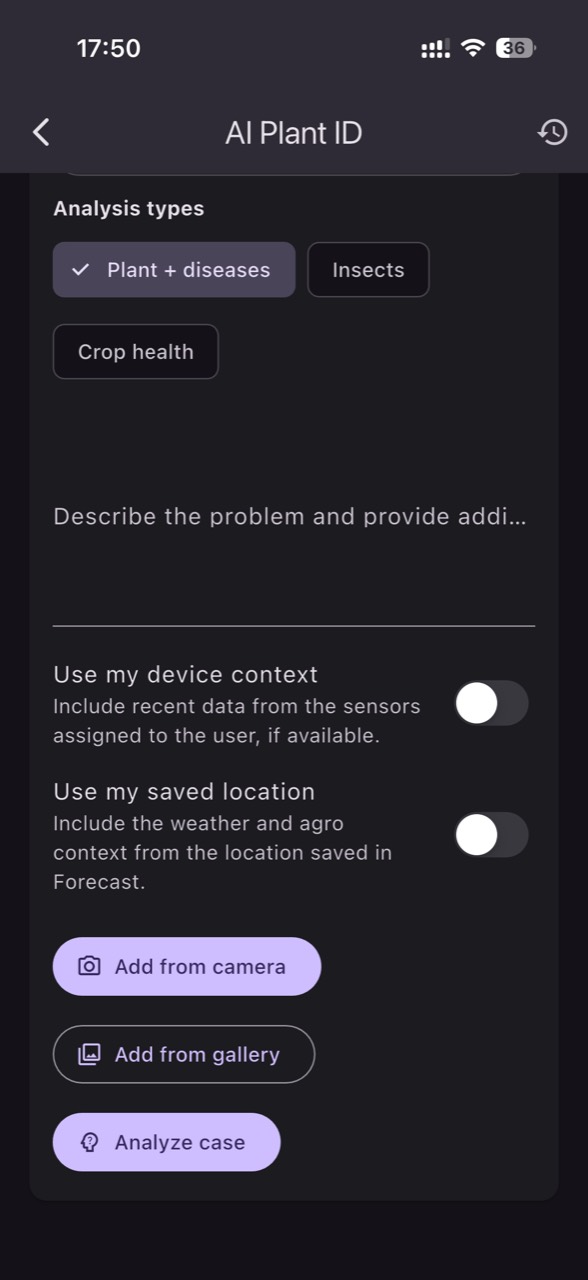
AI Plant ID is useful to suggest likely categories (for example pest, disease, deficiency, stress), but it is not a laboratory and it does not detect a pathogen. The correct mechanism: treat the suggestion as a hypothesis, then look for data compatibility. For instance, if AI suggests water stress, verify whether root-zone moisture dropped and estimated VPD rose; if it suggests salinity stress, check EC in the measured medium (soil, substrate, or drainage—whichever you actually monitor).
What to verify independently: for pests, visual confirmation (traps, hand lens); for diseases, look for signs (mycelium, sporulation) and distribution (foci). For nutrition, don’t confuse EC with composition: EC does not tell you which ion is missing, only total conductivity; pH influences availability, and irrigation-water alkalinity can stabilize pH against corrections. Practical decision: in GrowGuard, attach the photo to the field observation and note what you verified; confirm by checking whether the chosen hypothesis explains the image, the sensor trend, and the zone distribution at the same time.
7) Commissioning flow: from sensors that “send” to data that supports photos
Before you rely on photo–data correlations, validate that your data is accurate and comparable. Common failure mechanisms: a probe placed too close to a dripper (it only sees pulses), positioned at an edge (it sees a different microclimate), or with poor soil contact; plus transmission delays or “frozen” values. What to observe: graphs with unrealistic steps, long flatlines, or jumps that don’t match weather logic. Data freshness is part of validity: a photo taken today paired with yesterday’s readings can drive the wrong decision.
What to verify independently: a spot-check with a reference handheld instrument (temperature/humidity) or a manual moisture reading, plus a units audit (°C, %, kPa for estimated VPD, dS/m for EC, pH). Practical decision: define a few “reference points” on the farm—stable, well-understood areas—and compare to them periodically. Confirm by checking that after repositioning or recalibration, the data follows real events (irrigation, rain, ventilation) with an explainable lag, and photos from that zone do not repeatedly contradict what sensors indicate.
8) From diagnosis to action: cautious interventions and post-event verification
Once you have a hypothesis supported by photo and data, the intervention should be proportional and verifiable. The mechanism: in horticulture, many corrections have side effects (more water can reduce EC but may induce hypoxia; more ventilation can lower humidity but can increase water stress). What to observe: which variable you intend to change and which variables might move “collaterally.” When possible, choose one main step so you can attribute effects.
What to verify independently: after intervening, confirm the system did what you think it did (for example irrigation actually ran, pressure was correct, and the fertigation solution had pH/EC measured with dedicated probes). A hypothetical example: a photo shows slight leaf-edge burn plus a rising substrate EC trend; the action could be a controlled leach and a drainage check. Confirm by reviewing EC trend in the same medium, watching turgor recovery over hours/days, and comparing symptom progression in repeated photos.
Conclusion
When you treat the photo as the “indicator” and data as the “record of the cause,” you reduce guesswork and increase the chance you’ll pick the right verification: roots, irrigation function, microclimate, salinity, or biological pressure. The protocol only works if you preserve comparability: the same zones, the same times, the same units, and clear labeling of the medium in which EC/pH were measured.
If you want a unified workflow, you can use GrowGuard’s AI Plant ID as a starting point for hypotheses and to connect visual scouting to zone-based sensor history, with alerts that flag deviations. For robust outcomes, keep the discipline of independent checks and post-intervention validation, then iterate your thresholds and scouting routine. If needed, request a short demonstration of the workflow in your farm context.