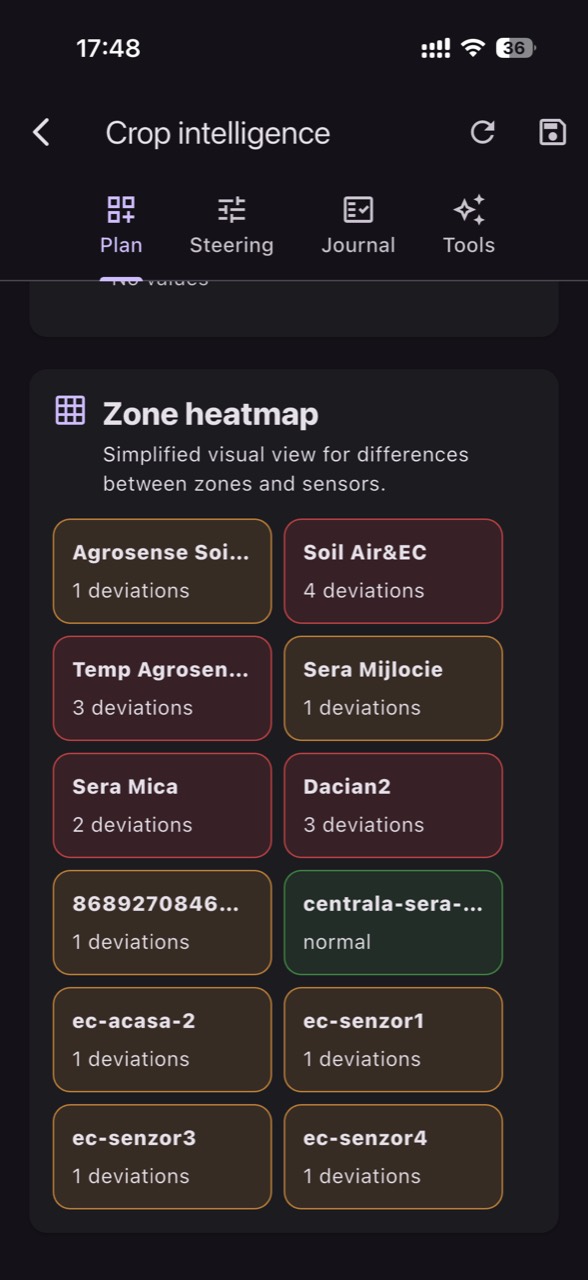
In horticulture, a crop is rarely uniform: the same greenhouse can have colder ends, drier aisles, rows with drafts, or substrate that drains differently. If you look at one average value (or a single “central” sensor), you risk optimizing for one spot and losing quality or uniformity everywhere else.
A sensor map is not just a drawing with pins on a floor plan. It is a working discipline: defining relevant zones, choosing measurement media (air, soil, substrate, solution), setting units and reading frequency, and then interpreting differences as patterns rather than exceptions. Only then does an alert become an action.
The article below explains the fundamentals and a commissioning workflow for zone-based monitoring. You’ll see what mechanisms create variation, what to observe in the crop, what to verify independently to avoid sensor mistakes, what practical decisions you can make, and how to confirm—using both data and plants—that the intervention had the intended effect.
1) Why isolated readings “lie”: mechanisms of variability in crops
Variability comes from physics and biology: air stratifies with height, ventilation creates jets and dead zones, irrigation loses pressure along long runs, and soil/substrate is uneven in texture and compaction. Plants respond locally: transpiration drops where VPD is higher, while another area may carry more condensation risk. One sensor can look “OK” while edges deviate enough to affect growth and uniformity.
What to observe: differences in vigor, stem thickness, leaf twisting, discoloration, areas that repeatedly dry out, or spots that stay waterlogged. What to verify independently: irrigation condition (drippers, pressure, filters), drainage, shading, drafts, and—when needed—spot checks with a portable instrument. Practical decision: define risk zones from day one (ends, near doors, near heat sources). Result check: compare zone trends before/after the intervention and confirm visual uniformity improves.
2) The zone as a management unit: defining it without unnecessary complexity
A useful zone is an area where you expect the microclimate and root zone to behave similarly—and that you can manage coherently. In greenhouses/tunnels, zoning often starts with bays, ends versus center, sidewalls versus middle, and vertical height (especially for air sensors). It can also follow technology differences (e.g., a screened section, a double film area, a differently shaded block). In open fields, aspect, slope, soil texture, and distance from windbreaks can matter.
What to observe: where the recurring complaints happen—“it always dries here” or “this corner always frosts.” What to verify independently: whether there is separate control (valves, sectors, vent openings) that justifies a distinct zone; otherwise you may only generate data with no levers to act on it. Practical decision: start with 3–6 zones that make operational sense, then refine. Result check: if decisions differ by zone, zoning helps; if not, simplify.
3) Choosing sensors per zone: medium, units, and interpretation traps
A map only becomes meaningful when you measure the right variables in the right medium. Air temperature and relative humidity describe the atmosphere, but they do not directly tell you what happens in the root zone. Soil/substrate moisture is a different family of measurements, and EC/pH require dedicated probes and must be interpreted according to the method used. VPD computed from air temperature and RH is an estimate: leaf temperature can be cooler or warmer than air, especially under strong radiation or airflow.
What to observe: water-stress symptoms that don’t match “good temperature,” or consistent quality differences (fruit/flower size, firmness, shelf life) between zones. What to verify independently: what units the sensor uses (for example, volumetric content versus tension for soil water), and what EC actually represents (fertigation solution, substrate extract, or bulk soil at varying moisture). EC does not identify individual nutrients; for composition you need analysis. Practical decision: choose the variables most likely to differentiate zones first, not “everything.” Result check: if two zones are always identical for a variable, the sensor type or its placement may not capture the real difference.
4) Correct placement: the same sensor, different results
In the air, position relative to radiation and airflow changes the reading. A sensor in direct sun or near artificially warmed surfaces will report higher values than the plant experiences. In the root zone, depth and distance from the dripper matter: too close and you measure post-irrigation “shocks,” too far and you may read chronic dryness. In substrates, it matters whether the probe sits in representative volume (not a pot edge or slab corner) and whether drainage is consistent.
What to observe: graphs with extremely sharp “teeth” after irrigation, or nearly flat lines that don’t respond to obvious events. What to verify independently: physical position, mounting and contact with the medium, radiation shielding for air sensors, and repeating a measurement at two nearby points to rule out an installation error. Practical decision: install a “reference” sensor in a stable zone and use it as a comparison anchor. Result check: after moving or correcting placement, the response to events (irrigation, ventilation) should be plausible and consistent with field observations.
5) Map-based commissioning: a 7-step protocol without assumptions
Commissioning means proving that every point on the map has a clear identity, correct units, and fresh data. Recommended workflow: (1) name zones and points unambiguously; (2) record the measurement medium for each sensor; (3) verify date/time and transmission interval; (4) confirm units and any conversions; (5) document installation in the field (photo and sketch); (6) run an event test (hypothetically: a short irrigation, or a controlled vent opening); (7) set provisional thresholds and a learning period.
What to observe: long latency, data gaps, or unexplained “jumps” between transmissions. What to verify independently: battery, signal quality, cable integrity for probes, and whether the sensor measures what you think it does (a temperature sensor does not measure EC/pH). Practical decision: avoid critical alerts until you have at least several days of representative history for each zone. Result check: after commissioning, you should be able to explain why each zone differs and what event produced the change.
6) Interpreting by zones: from “that’s the number” to “that’s how the system behaves”
A good map teaches patterns: which zones warm first, where humidity drops after a sidewall opens, which sectors re-wet more slowly after irrigation. Look for correlations and time lags: if air dries quickly in one zone, the root zone may enter deficit earlier and the plant may close stomata, reducing growth. Conversely, a humid-air zone can keep leaves wet longer, raising disease risk without being a “soil problem.”
What to observe: on the same day, two zones have similar average temperature but different amplitude; or they show similar calculated VPD while plants look different. What to verify independently: local factors (shading, screens, fans/diffusers, a frequently open door, substrate differences). Practical decision: turn the difference into a local action where possible (e.g., ventilation adjustment, pressure equalization on irrigation lines, sector schedule adjustment if sector control exists). Result check: after the change, look for reduced zone divergence and improved visual uniformity, not just a “prettier” single number.
7) Independent checks: separating a real crop issue from a measurement error
When one zone “goes off-chart,” you have two hypotheses: the crop truly has a local problem, or the sensor/installation has one. Before you intervene aggressively, check plausibility: does the sensor react to events, is the value stuck, does it repeat the same number for too long? For EC/pH, remember the difference between source water, fertigation solution, and measurements in substrate/soil. On-site monitoring complements laboratory analysis; it does not replace it, and the media are not equivalent.
What to observe: a zone reports high soil EC, but plants show no matching symptoms and drainage looks fine; or pH seems “perfectly” stable regardless of fertigation events. What to verify independently: manual measurement in the same medium (e.g., a substrate extract if the probe is in substrate), calibration checks per the sensor manufacturer, and a temporary comparison with a second sensor (hypothetically for 48–72 hours). Practical decision: flag the sensor as “suspect” and avoid changing recipes/irrigation based on it until confirmed. Result check: after correction or recalibration, the signal should align with other zones under similar conditions—without erasing real differences.
8) From map to decisions: intervention, feedback, and evolving thresholds
The value of a map is the feedback loop: you observe a difference, form a hypothesis, intervene, then verify whether the difference reduced and whether the plant responded. Hypothetical example: Zone A repeatedly dries in substrate by afternoon while Zone B does not. Hypothesis: uneven water distribution or higher radiation load. Intervention: check line flow and, if sector control exists, adjust duration or frequency locally. Verification: see whether the moisture curve stabilizes and whether plants in A regain uniformity.
What to observe: after a change, the “number” may improve but side effects appear (for example, higher air humidity and condensation risk). What to verify independently: field inspection (leaves, soil/substrate feel, drainage) plus correlation with weather and operations on that day. Practical decision: alert thresholds should be zone-specific and mature with history; don’t copy thresholds from one zone to another. Result check: keep a simple intervention log and compare before/after within the same zone, not across completely different days.
Conclusion
A crop does not live in “average” conditions. It lives in corners, ends, rows, and sectors—and that’s where early signs of stress, non-uniformity, and quality loss appear first. A sensor map built on operationally meaningful zones helps you see the mechanisms behind the numbers: air dynamics, root-zone behavior, water distribution, ventilation effects, and substrate inertia.
If you use GrowGuard, zone maps can organize these points into a comparable picture with location-based history and alerts, helping you test hypotheses and check intervention results faster. For a safe start, apply the commissioning protocol above, then gradually refine your zones based on real differences in your own crop.