In greenhouses, the most expensive mistakes often start from a simple assumption: “the sensor is telling the truth, so the crop has a problem.” The reality is that a sensor tells the truth about the point where it is installed and about the medium it measures. If placement is wrong, the reading can be correct—and the conclusion completely wrong.
MQTT complicates and helps at the same time. It complicates things because it adds a network layer, message formats, timestamps, and “retained” messages that can look current. It helps because it lets you collect data quickly from many points and compare microclimates between zones, not just isolated values. Diagnosis becomes possible, but it must be done methodically.
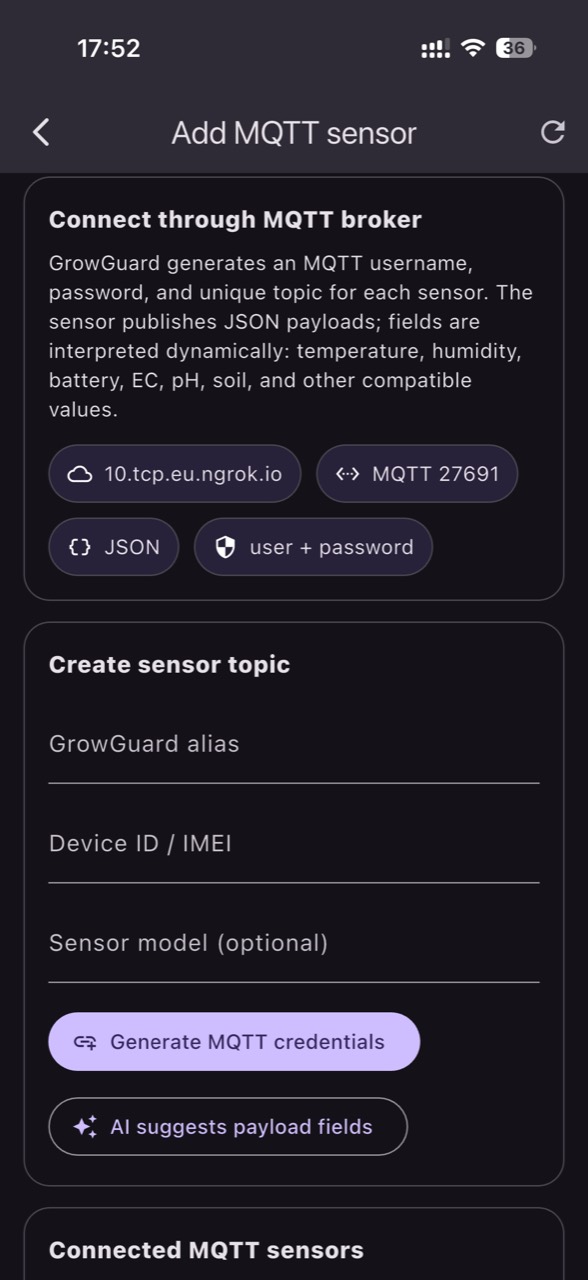
This article is a diagnostic guide: how to connect sensors and automation over MQTT in a project compatible with GrowGuard and, most importantly, how to distinguish a real crop or equipment problem from a misleading reading. The focus is sensor placement, defining crop zones, and comparing microclimates—with independent checks and steps to confirm the result.
1) MQTT in a greenhouse: what it guarantees—and what it doesn’t
MQTT is a publish/subscribe protocol: devices publish messages to “topics,” and interested systems subscribe to those topics through a broker. In practice, a sensor does not “send to an app,” it sends to the broker, and the integration reads from there. QoS (quality of service) tells you something about message delivery on the network—not whether the measurement is correct, and not whether a physical action (for example, opening a vent) actually happened.
In diagnosis, the most common traps are: retained messages that appear as the latest value even if they are not fresh; reconnects that send a burst of old data; and the absence of a clear measurement timestamp. The fix is to treat freshness as a quality parameter: verify whether the payload includes measurement time and define an “age check” rule before interpreting events. Only then should you compare zones or trigger investigations inside the greenhouse.
2) Topic modeling: when the schema ruins your diagnosis
Your topic schema must unambiguously distinguish physical location, crop zone, sensor type, and the medium being measured. Otherwise, you end up comparing air with substrate, or a shaded spot with an exposed one, without realizing it. A hypothetical example: “greenhouse1/temperature” combines two different probes installed at different heights; the chart becomes a blend that looks “unstable,” and you start looking for a heating fault even though the real problem is labeling.
A robust model separates device identity from agronomic meaning. Identity (device ID) stays constant; meaning (zone, row, compartment) is managed separately as metadata. In GrowGuard, the practical point is that you can map the same sensor types to distinct zones and compare microclimates coherently. When an anomaly appears, the first step is to check whether the message arrived on the correct topic and whether you accidentally “borrowed” a probe from another zone at the labeling level.
3) Freshness, units, and measurement medium: the triad that separates real from false
In a greenhouse, the same physical quantity can mean something different depending on units and the measurement medium. Air temperature is not leaf temperature; VPD calculated from air temperature and relative humidity is an estimate because the leaf can be cooler or warmer. Likewise, EC depends on where you measure it: in the fertigation solution, in drain water, in substrate, or in soil; you cannot compare directly unless you record the medium and probe method. A temperature sensor does not measure EC or pH—those require dedicated probes.
For diagnosis, check three things before suspecting the crop: (1) measurement timestamp and message age; (2) units declared in the payload (°C vs °F, % vs fraction, mS/cm vs dS/m); (3) measurement medium (air, soil, substrate, drain, water). A practical decision: if you see a sudden EC increase in “zone A,” confirm with an independent measurement in the same medium (for example, drain EC with a handheld conductivity meter), then check whether the jump aligns with a nutrient mixing event.
4) Air sensor placement: real microclimates or artificial “hotspots”
Air readings are extremely sensitive to placement. A sensor too close to a heater outlet will report a local “heat wave”; one near a door will report a “cold draft”; one mounted against structure may “see” the cold radiation of metal at night. The mechanism is straightforward: convection and radiation create layers and extreme points. What you observe: large differences between sensors in the same greenhouse, without uniformly matching crop symptoms.
What you verify independently: spot-check with a portable thermometer/psychrometer at multiple positions at the same height, especially during transitions (fans starting, vents opening, sunset). Decision: if the difference is local, move the sensor to a representative point for the crop zone (away from direct sources, well ventilated). Result check: after repositioning, zone-to-zone differences should logically reflect airflow patterns (for example, end bay vs center), not artifacts caused by proximity to equipment.
5) Substrate/soil sensors: how “irrigation problems” appear when it’s only installation
Soil or substrate probes can create illusions if they are not installed in the active root volume or if they have poor contact with the medium. In substrate bags, a probe pushed into a corner can sit in a drier pocket; in soil, an air gap near the probe can distort the response. The mechanism is that you measure a point that is not irrigated like the rest, or you measure slow transitions due to imperfect contact.
What you observe: “irrigation happened, but moisture doesn’t rise,” or “moisture jumps suddenly” with no link to cycles. What you verify independently: physically inspect dripper operation and distribution, then manually check moisture near the probe (a simple gravimetric check or another instrument). Practical decision: reinstall the probe in a representative location (in the wetted band, at active root depth) and record the change as an event for later analysis. Verification: after reinstallation, the response to an irrigation cycle should be coherent with repeatable dynamics.
6) Crop zones: how to design comparisons that actually explain differences
A “zone” is not a nice drawing on a map; it is a working hypothesis: within a zone, microclimate and water/nutrition regime are similar enough that a sensor is representative. In greenhouses, zones naturally form: near walls, near doors, under screens, at row ends, on different irrigation lines. If zones are defined poorly, comparisons will lie: you will think you have a “corner disease,” but in reality you defined the corner as a zone while the crop conditions are mixed.
What you observe: persistent differences between two points that do not align with phenology or crop uniformity. What you verify: confirm that zones match the real compartmentalization (irrigation, ventilation, shading) and that each zone has at least one comparable “reference” point. Decision: adjust zones so each has a technical reason (same circuit, same conditions). Result check: after redefining zones, differences should be explainable by infrastructure, not by coincidence.
7) MQTT automation: how to avoid confusing a command with an action
In automation projects, MQTT transports commands and statuses, but it does not guarantee that an actuator actually executed. A hypothetical example: you publish “ventilation=ON” and get QoS confirmation, but a contactor is stuck or a motor is in fault; on charts it looks like you “ventilated,” yet humidity stays high and you wrongly conclude there is a vapor source in the crop. The mechanism is confusion between message delivery and successful physical action.
What you observe: commands appearing in the system without the expected microclimate response (temperature/RH/VPD). What you verify independently: request equipment state feedback (aux contact, power draw, position) as a separate topic and compare it with the climatic effect. Practical decision: define a validation loop in the project: “command” + “state” + “effect.” Result check: once implemented, control events should line up in time with plausible changes in data; otherwise, trigger maintenance rather than tuning setpoints.
8) Differential diagnosis: when it’s the crop, when it’s equipment, when it’s only the reading
A useful approach is to start from a data symptom and build 2–3 possible causes, then eliminate them using zone comparisons. Hypothetical example: in one zone, relative humidity rises more at night than elsewhere. Possible causes: insufficient local ventilation, a screen closing differently, cold air infiltration that increases RH, or a sensor mounted in a cold-layer corner. The mechanisms differ: some increase vapor content; others only reduce local temperature.
What you observe: whether temperature also shifts in the same direction, whether the effect repeats only under certain wind conditions, or whether it appears immediately after a screen/vent command. What you verify: physically inspect the zone (condensation on structure, drafts, damper operation), then compare with a mobile sensor. Decision: treat what is quickly verifiable first (repositioning, cleaning a shield, checking a fan), and only then change the climate strategy. Result check: in zone history in GrowGuard, the difference between zones should shrink or become explainable after the intervention.
Conclusion
MQTT can make a greenhouse “transparent” only if you treat data as a diagnostic instrument, not as a verdict. Message freshness, units, and measurement medium—plus a clear topic scheme—matter as much as the sensor itself. Correct placement and well-defined zones turn microclimate comparisons into a method for separating causes, not a source of confusion.
If you want, you can use GrowGuard as a zone-based interpretation layer over MQTT data, while a separate automation project can add commands and state feedback. Start with disciplined commissioning: validate one point, then expand to zones, then validate the “command–state–effect” loops. For integration and verification, talk to your integrator or request a commissioning plan.